BayOS for commercial facilities

Run a 24/7 sim studio without being on call.

Not just booking software. BayOS takes the booking, opens the door, preps every bay, answers your customers and sells on the screen. You get your evenings back.

30 days freeRuns on your existing bay PCsSquare or Stripe
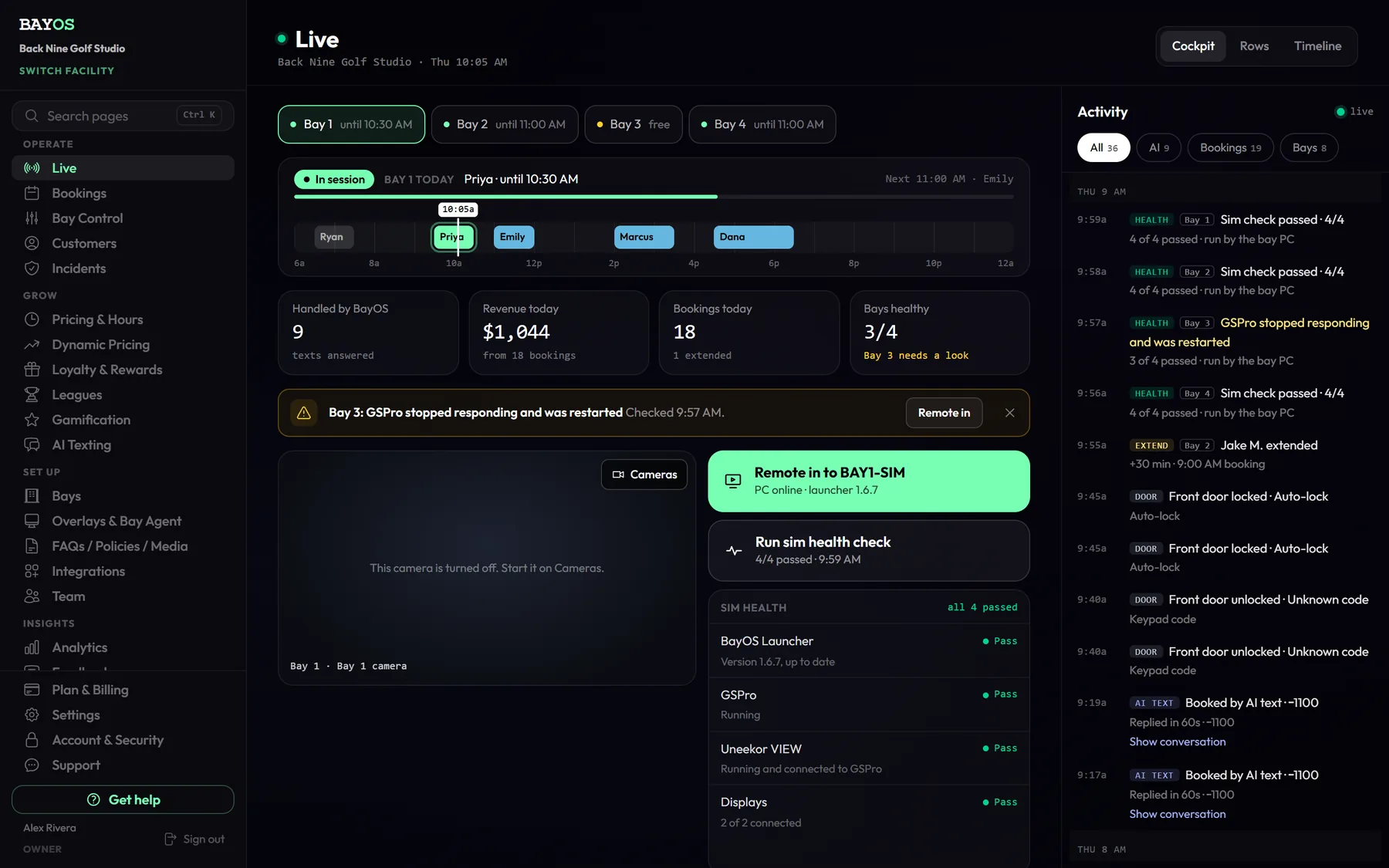
The real BayOS Live page: every bay's bookings on a timeline, 9 texts answered, $1,044 revenue today, and a note that GSPro on Bay 3 stopped responding and was restarted
Texts answered today9
Revenue today$1,044
Bay 3 fixedGSPro stopped responding and was restarted.
The commercial lineup

Everything a staffed studio does. Without the staff.

Five products that run the business and the bays, and one on the way. Tap any of them to see the real thing.

Booking

Commercial

Booked, paid and through the door. Without you.

  • Online booking with Square or Stripe
  • A door code by text for every booking: RemoteLock, Kisi in beta
  • Memberships, loyalty, leagues and tournaments
  • Demand pricing with hot deals, never below your floor

Sim Agent

Commercial

A virtual assistant that runs your facility.

  • Answers the phone and responds to texts
  • Answers questions about your facility
  • Holds bays and sends payment links
  • Turns your simulators on and off based on when they're booked

SimCast

Commercial

Turn the screen everyone stares at into revenue.

  • Welcome by name, timers, tips and promotions
  • Add time from a QR code on the screen
  • Local sponsor ads with proof of every play

Sim Control

Commercial

One booking turns on the whole bay.

  • Lights, projectors, TVs and PCs on before, off after
  • Smart plugs, IR blasters, Roku and Wake-on-LAN
  • Remote in to any bay from your phone

SimFloor

Commercial · Home

Make your bays the premium option in town.

  • Start lines, putting gates and live shot data on the mat
  • Your logo on every floor
  • 21 training aids, and no OBS to babysit

Sim Coach

Coming soon

Coming soon.

Every feature

Tap any feature to see it work.

Best stuff at the top of every column. Each one opens a screenshot, a live demo or a calculator, and you can swipe through the rest from there.

0%→0%passive income, in our own studios
0 hrsback every week, on average
0missed calls or texts
0→1apps replaced by one portal
No new hardware

Runs on what you already have.

BayOS runs on your existing Windows bay PCs and connects to the gear and accounts you already use. Members carry over from Square or Stripe.

UneekorGSProRoku TVsKasa plugsTapo plugsRemoteLockKisi (Beta)SquareStripe
30 days free

Try everything for a month.

Every new facility starts with 30 days of Autopilot, our top plan, with everything unlocked. Then keep the plan that fits. Nothing you set up is deleted.

Pricing, out in the open

Build your plan. See the real price.

Priced per bay, per month. The more bays, the less each one costs. Every new facility starts with 30 days of everything.

4
Bays 1–2 full price · bays 3–4 20% off · bay 5 and up 35% off
Founding price: the first 50 facilities get Operate at $129 a bay, locked in for 24 months.

Add-ons

Value vs cost

What it costs, next to what it gives back.

Move the sliders to match your studio. The cost side comes straight from the plan above.

What BayOS brings in or saves, a month$0
What BayOS costs, a month$0
$0

How we estimate: 30% of missed texts would have booked a $60 session · power at 1 kW a bay and 15¢/kWh, off when nobody's booked · 20 hours a week back is what our own studios average. An estimate to start a conversation, not a promise.

Home Have a sim at home?

Get more out of the sim you already own.

SimFloor puts start lines, putting gates and live shot data on your home mat, with no OBS. The beta is opening to a small group first.

See BayOS for home
Built by owners

We built BayOS because we were tired of our phones. We've answered the 2 AM texts, driven over to restart a PC, and lost bookings to a text we didn't see. Every feature exists because one of us hit that problem and wanted it gone.

Elias and Thomas · seven years running 24/7 studios
FAQ

Questions owners ask us.

Can anyone text my number and control a bay?

No. Only the golfer whose booking is playing in that bay right now, texting from the number they booked with, can ask the agent to check or fix it, and only that bay. Anyone else is told to ask the person who booked, or is passed to you. A full bay reset or a PC restart also needs a code the agent texts to that golfer.

Is there a free trial?

Yes. Every new facility gets 30 days of Autopilot, our top plan, with everything unlocked. Then you pick the plan that fits. Nothing you set up during the trial is deleted.

How does multi-bay pricing work?

Bays 1 and 2 are full price, bays 3 and 4 are 20% off, and bay 5 and up are 35% off. The discount applies to the plan price. Add-ons are priced as listed.

What's the founding price?

The first 50 facilities get Operate at $129 a bay instead of $149, locked in for 24 months.

Will the agent say something wrong to my customers?

It only answers from your prices, policies and FAQs. When a question is outside them, it hands the conversation to you.

What if something breaks that BayOS can't fix?

You get an alert on your phone, and you can remote into the bay from your phone in one tap.

Do I need new hardware?

No. BayOS runs on your existing Windows bay PCs and works with Uneekor and GSPro, Roku TVs, Kasa and Tapo smart plugs, and RemoteLock or Kisi (Beta) door locks.

Can I keep my payment processor?

Yes. BayOS connects to Square or Stripe, and imports your customer directory from either, so members carry over.

Will local businesses really pay for ads?

Yes, and it's easier than most owners think. A $50 spot in front of local adults who are already thinking about food and drinks is an easy yes for a pizza place or a sports bar. BayOS counts every play so they can see what they got, and keep renewing.

How long does switching take?

Import your Square or Stripe customer directory and keep your payment processor. Setup wizards configure your facility in one pass, and we'll give you a thorough demo and walkthrough so you're confident from day one.
Book a demo

Get your evenings back.

Book a 20-minute demo. We'll show you a night with BayOS, on a real studio, and help you set up yours.

Plan attached:

$0/mo
See plan